
Omarchy Plugin Marketplace
I said at the end of the Installing Omarchy blog that this stopped being a migration and turned into a bit of a hobby. This is the blog where I have to admit how much!
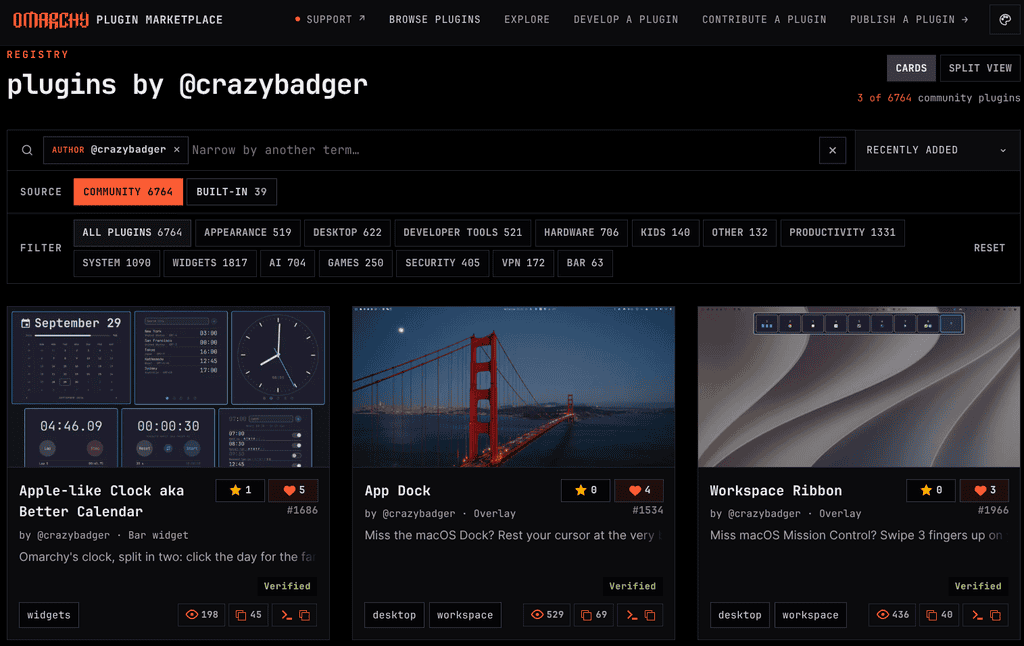
I’ve written six plugins for Omarchy’s menu bar and desktop; three of them are on GitHub for anyone to download and install, and they are listed on the plugin marketplace with four tagged releases.
None of that was part of the original plan, which was just something to report the fan speed! I still find it pretty crazy that with the help of an AI coding agent, which almost feels baked into the OS, you can actually start to create your own bespoke OS! Welcome to 2026 😁
How it started
The HP’s fan was annoyingly audible, and there was no fan control, so I went looking for one and couldn’t find anything. Back in 2016 that would have been the end of it. I’d have written a grumbling paragraph here and moved on, because the gap between ‘I wish this existed’ and ‘I could write this’ was far too wide.
Omarchy’s bar is Quickshell, which means the widgets are QML. A plugin is a folder in `~/.config/omarchy/plugins/` with a `manifest.json` describing it and a `.qml` file doing the work. That’s genuinely it. Mine are between one and twenty files, and the first one took an evening.
Two kinds have covered everything I’ve wanted so far. A `bar-widget` lives in the menu bar alongside the volume and the battery. An `overlay` draws over the whole screen, which is what you want for anything Mission-Control-shaped.
## Fan Speed
The one that started it. This HP hardware doesn’t report fan RPM at all, so it reads the embedded controller’s fan register directly and shows an estimated `Fan 40%` pill, with a popup for CPU, GPU and NVMe temperatures and a 1h/6h/24h history graph.
It’s also the one plugin I’ve deliberately kept in a private repo, for two reasons. The register offsets and the raw-to-percent calibration are specific guesswork for an EliteBook 6 G1a and would be meaningless or misleading on anything else. And it isn’t pure QML — it ships a small root-side daemon with a systemd unit to read the EC, which a plain plugin install won’t set up for you. Publishing something that needs a `sudo` step to work properly also felt wrong.
I also got the maths wrong twice. Early versions reported 0% while the fan was clearly spinning, and the history graph averaged its buckets so every peak quietly vanished on the 6h view. Bucket by maximum, not average, if you ever build one of these.
Apple-like Clock aka Better Calendar
This is the big one, and one of the published ones. Omarchy’s bar clock shows the day and the time together. Mine splits it in half — click the day, and you get the calendar you expected; click the time, and you get a clock card with five pages: a world clock for up to six places, an analogue clock (the default), a stopwatch with laps, a countdown timer that remembers the last five and can repeat, and alarms with repeat days and snooze.
It’s at 1.4.0, which tells you how this went. 1.1.0 added the stopwatch and timer, 1.2.0 the world clock, 1.3.0 repeating timers, 1.4.0 alarms. Each one started as ‘I’ll just add…’. The Apple iPhone clock provided some inspiration.
Workspace Ribbon
This is the one I’m most pleased with, because it closes a loop I opened ten years ago. In 2016 I wrote that trackpad gestures were the thing I’d miss most about macOS and probably what killed my first attempt at living in Linux.
Three fingers up on the trackpad now gives me a strip of every workspace across the top of the screen with live app icons on each tile. Click one, or press its number, and you’re there. Three fingers down dismiss it. It is shamelessly Apple Mission Control, and I use it all the time.
App Dock
The sibling, and the obvious next thing once the ribbon worked. Rest the cursor at the very bottom edge of the screen, and a Dock-style strip of every open window slides up, ordered by workspace. Click an icon to jump to it.
No gesture on this one — it’s a cursor-position poller, because ‘put your mouse at the bottom of the screen’ is the actual macOS behaviour I missed.
The two clones
`adrian.tray` and `adrian.indicators` are copies of Omarchy’s own tray and status icons with one change each. The tray lets me order the icons the way I want. The indicators appear when the pointer is anywhere over the bar, not just over the middle.
Neither will ever go near the marketplace. They’re forks of stock widgets to suit one person’s preferences, which is a perfectly good reason to write something and a poor reason to publish it.
The private fork
Worth a mention because it’s an awkward bit of housekeeping. What my bar actually runs isn’t the published clock — it’s a private fork of it that adds my iCloud calendar, with coloured dots per calendar and a flip to a day’s events. That needs an app-specific password in the keyring, so it’s never going public.
The cost is that improvements to the public plugin only reach my own bar when I remember to merge upstream by hand. I have forgotten. Twice.
Things that cost me an evening each
Worth writing down, because none of them is in any documentation I could find. Editing a plugin’s code and rescanning isn’t enough — you need `omarchy restart shell` before anything you changed actually runs. I spent a while convinced a fix hadn’t worked when it had.
Overlays need `keepLoaded` set to true in the manifest, or the thing gets torn down and rebuilt, and your state goes with it.
Window icons are the fiddly part. Matching a window to its `.desktop` entry by one property gets you most apps and leaves web apps and Electron things blank, so mine cross-references the title as well. And if you’re asking Hyprland about a window by address, the address needs its `0x` prefix, or you’ll get nothing back and no error.
Cursor coordinates are in logical units, not physical pixels. On a scaled display, those are different numbers, which is obvious in hindsight and was not obvious at eleven at night!
Making the repo and getting listed
The publishing process is pleasantly dull, which is how it should be.
A plugin repo needs to be public, with `manifest.json` in the root, a README and a licence. A `preview.png` is optional, and you should do it anyway — it’s the only thing anyone sees before deciding whether to install. The manifest wants `schemaVersion`, `id`, `name`, `version`, `author`, `description`, `kinds` and `entryPoints`. The `id` is namespaced, so mine is `crazybadger.split-clock` and
friends.
Before submitting, `omarchy plugin clone` and `omarchy plugin validate` check the thing over. Run them. Then you submit through an issue form on the marketplace with your repo link, a category and some tags; automated validation checks the current commit, and a maintainer approves the listing.
Two things I’d pass on. Tag a release for every version, at the commit you actually tested, because the marketplace shows your version and people will install whatever is on `main`. I back-filled all four of my tags in one sitting after the fact, which works but is mildly dishonest, and I wouldn’t do it again.
And the marketplace is clear that it validates listings, not security. Plugins run unsandboxed, in your shell, with your permissions. That cuts both ways. It’s why writing one is so easy, and it’s why you should read the QML of anything you install, including mine.
If you want to look, the published one is at plugins.omarchy.org/plugin.html?id=crazybadger.split-clock, and the Workspace Ribbon and App Dock are on my GitHub and install with `omarchy plugin add`.
Both repos still have descriptions I wrote in about four minutes and no topics set on them at all, which I’m going to fix immediately after publishing this post. Possibly!
Recent Comments